
swiftのローカルスコープ
色々と試して出来ないのかと、諦めていた。 が、ググると stackOverFlowのサイトに答が有った。
http://stackoverflow.com/questions/24011271/how-to-create-local-scopes-in-swift
こーやって、locallyを定義すると。
func locally(work: () -> ()) {
    work()
}
こんな風に、使える。
locally {
    let g = 42
    println(g)
}
swiftでは引数の最後の引数は括弧の外にだしても良いようだ。
色々と、試してみるとこんな感じ。
func local(test:Int, inWork:()->())
{
    inWork();
}

// OK
local(12,
    {

    })

// OK
local(12){

}

// Error
local(12)
{

}
3番目の例が文法的に許さないのは、単純なローカルスコープと引数の区別が出来ないのかも知れない。
swiftでは@synchronizedはサポートが無いそうなので、このローカルスコープを作る方法を利用出来そうだと思った。 が、これもまた、ググると stackOverFlowのサイトに答が有った。
func synced(lock: AnyObject, closure: () -> ()) {
    objc_sync_enter(lock)
    closure()
    objc_sync_exit(lock)
}

synced(self) {
    println("This is a synchronized closure")
}
この、クロージャーを受け取って、その前後で定型処理を行うのは結構つかえるテクニックに見える。 例えば、
func cgLoclaContext(closure: () -> ()) {
    var theContext: CGContext;
    CGContextSaveGState(theContext)
    closure()
    CGContextRestoreGState(theContext)
}

cgLoclaContext() {
    // ココで、描画色を変えたり、クリッピングリージョンを変えたりする。
}
// ここまでくると、CGContextの状態が自動で戻る。
ローカルスコープと、CoreGraphixの状態を一致させる事で状態の戻し忘れ等のミスを防げそう。
IB_DESIGNABLEとIBInspectable
XCodeでInterfaceBuilderようの新たなキーワードが定義された。 定義されたのはIB_DESIGNABLEとIBInspectableの2つ。
| IB_DESIGNABLE | 編集可能にしたいクラスに付ける |
| IBInspectable | 編集可能にしたいプロパティに付ける |
IB_DESIGNABLEは以下のように@interfaceの前に付ける。
IB_DESIGNABLE

@interface CustomView : NSView
.
.
.
IBにこのクラスが編集可能である事を知らせる為だけのキーワードらしい。
一方、IBInspectableは少し複雑。
@interface CustomView : NSView

@property (nonatomic) IBInspectable NSColor* fillColor;
@property (nonatomic) IBInspectable NSPoint point;
@property (nonatomic) IBInspectable NSRect rect;
@property (nonatomic) IBInspectable NSString* string;
@property (nonatomic) IBInspectable BOOL thisIsBool;
@property (nonatomic) IBInspectable NSImage* thisIsImage;
@property (nonatomic) IBInspectable NSInteger intgerValue;
@property (nonatomic) IBInspectable float floatValue;
@property (nonatomic) IBInspectable double doubleValue;
.
.
.
上記のように型名の前にIBOutletのように付ける。そうするとIB側が適当にインスペクターに表示してくれる。 NSImageやNSColorはiOSではUIImageやUIColorになると思われる。
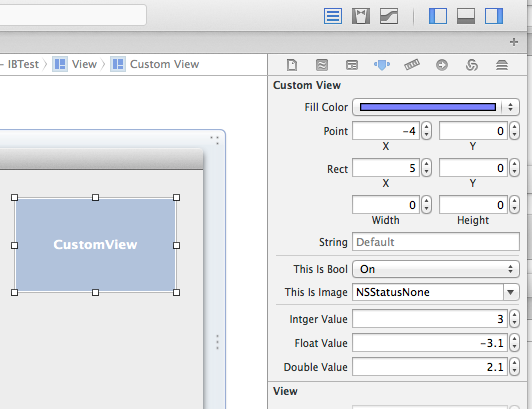
使える、型は決まっているようで物は使えなかった。
// Number型は表示出来ない
//@property (nonatomic) IBInspectable NSNumber* number;

// NSRangeは表示出来ない
//@property (nonatomic) IBInspectable NSRange range;

// NSValueは表示出来ない
//@property (nonatomic) IBInspectable NSValue* thisIsNSValue;

// 列挙は表示出来ない
//@property (nonatomic) IBInspectable TEST_ENUM updateType;
NSRangeが出来ないのは意外だが、IB上ではあまり使い道が無いのかもしれない。 贅沢を言えば、角度を表すUIに対応する型や、列挙型をサポートして欲しかった。
多分、”User defined Runtime Attributes”の機能をソースコードをパースして自動化出来るようにした物なんだろう。 “User defined Runtime Attributes”を表示するとリアルタイムで値が変わっている。
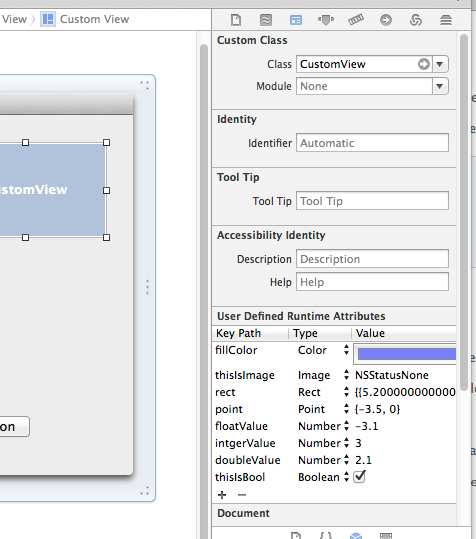
昔のIBPluginとは違った方向で作っているので、NSCoderとか無関係に実装出来ている。
IBでプレビューするには、framework化した上に、同じプロジェクトでコンパイルする必要がある等の面倒な面が有った。
日本語のmanは便利だ
ここ jmanを使わずにMacのmanを日本語化する方法 ( http://tukaikta.blog135.fc2.com/blog-entry-224.html ) を参考に環境整備した。
コチラの環境は MacPorts の為か、man がうまく jman を探してくれない。
仕方ないので .bash_profileに以下の行を追加した。
alias jman='env LANG=ja_JP.UTF-8 man -M /usr/local/share/man/: '
今までやせ我慢してたんだな。
NSSplitViewの同期
2つのNSSplitViewでSpliterPaneの位置を同期させたい。splitViewDidResizeSubviews:を使えば出来そうだと思いコードを書いてみた。
こんな感じ。
- (void)splitViewDidResizeSubviews:(NSNotification *)notification
{
    NSSplitView* theCurrentSplitView = (NSSplitView *)notification.object;
    NSView*      theParentView       = [theCurrentSplitView superview];
    NSArray*     theParentSubviews   = [theParentView subviews];

    NSArray* theSrcArray;
    theSrcArray = theCurrentSplitView.subviews;

    for(NSView* theDstSplitView in theParentSubviews)
    {
        if( theDstSplitView != theCurrentSplitView && [theDstSplitView isKindOfClass:[NSSplitView class]] )
        {
            NSArray* theDstArray;

            theDstArray = theDstSplitView.subviews;

            if( theSrcArray.count == theDstArray.count )
            {
                NSInteger theCount = theDstArray.count;

                for(NSInteger i = 0; i < theCount; i++)
                {
                    ((NSView*)theDstArray[i]).frame = ((NSView*)theSrcArray[i]).frame;
                }
            }
        }
    }
}
リサイズするとうまく動いてくれない。さて、どうした物か。
プロジェクトファイルは、 SplitViewTest1.zip に置いておきます。